AI cleaned up my social profiles in one morning
7 social profiles, 3 different messages, a dead Instagram link and no UTM tags. An AI agent fixed it in one morning. 5 minutes of my time.
I knew it for months. Every link to my site should carry UTM tags. Every profile should say the same thing. I check tracking for other people all the time.
My own profiles? I never did it. Every platform hides the bio and the website link on a different settings page, and it is boring clicking. There was always something more urgent.
On 19 November 2026 an AI agent did it in one morning. About 80 minutes of its work. About 5 minutes of my time.
What I found on the morning of 19 November
I have 8 profiles: LinkedIn, X, Instagram, Threads, Facebook, YouTube, TikTok and Pinterest. This cleanup covered 7 of them. TikTok, which I barely use yet, is still on my list. The brand started on 6 November. The site tomakadlec.com has been live since 11 November.
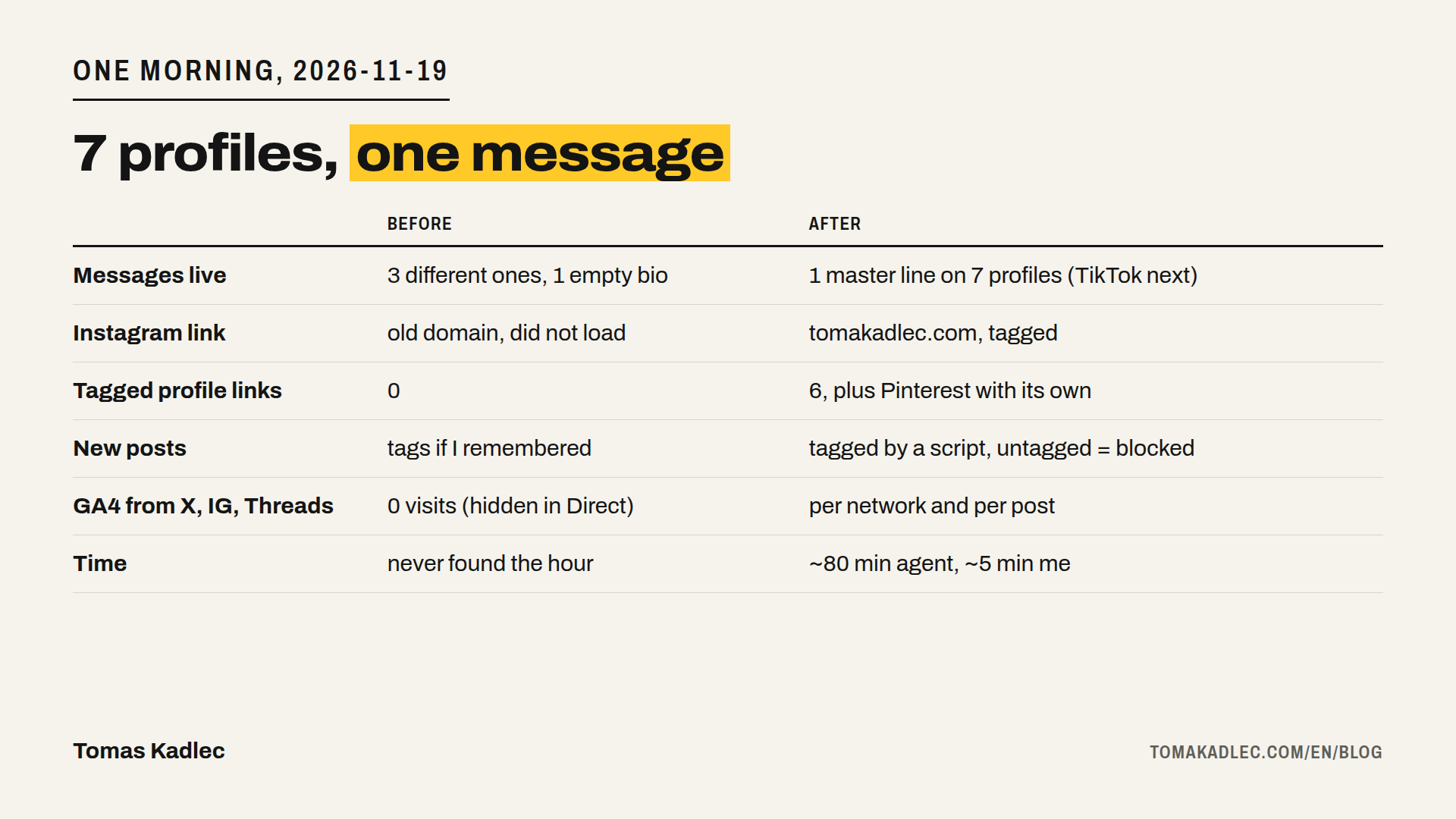
Three different messages were live at the same time. Instagram still had an old joke line, with my site typed as plain text. X and YouTube had the banner line "I test what AI can really do. You see the results." Pinterest had my master line. Facebook said only "support" and the domain. Threads had an empty bio.
The worst part: the Instagram website link went to www.tomaskadlec.info. That is the old domain I dropped when the brand moved to tomakadlec.com. The link did not load. Nobody told me.
And no profile link had UTM tags.
What GA4 showed, and what it could not show
First the agent pulled my GA4 numbers. In the last 28 days GA4 counted 23 sessions as "Organic Social". About 4 of them were real people.
Most Facebook visits came from Meta data-center towns and stayed 0 seconds. Those were link preview checkers, not people. 7 of 10 LinkedIn visits were 0-second visits to one tool page from two towns in the Philippines. The real ones: a LinkedIn in-app visit from Prague that stayed 152 seconds, one visit from Rennes, one Facebook visit from Prague.
X, Instagram, Threads and YouTube: 0 sessions.
That does not mean nobody clicked. Apps like Instagram open links in their own in-app browser, and the visit often arrives without a referrer. When GA4 gets no referrer and no campaign tags, it files the visit under Direct. Without tags you cannot tell the difference.
The fix is in the URL itself. A UTM tag travels with the link, so it does not need the referrer.
One tagging convention
Before it touched any profile, the agent wrote one convention. Google says to always use utm_source, utm_medium and utm_campaign. Missing ones show up as "(not set)" in reports.
| Parameter | Value | Example |
|---|---|---|
| utm_source | the network | linkedin, x, facebook, threads, instagram, youtube, medium, tiktok, pinterest |
| utm_medium | always social | social |
| utm_campaign | the format | post, article, profile |
| utm_content | the post id, or bio for a profile link | bio |
Why always "social"? GA4 puts a session in Organic Social when the source is on its list of social sites, or when the medium is social, social-network, social-media, sm, social network or social media. A made-up medium can end up in Unassigned. "social" works for every network.
So the profile link on Threads looks like this:
`https://tomakadlec.com/en/?utm_source=threads&utm_medium=social&utm_campaign=profile&utm_content=bio`
One bio from one master line
My master line: "I put AI agents to work. I show the numbers." The agent wrote one bio per platform from it, plus what I do: AI marketing for e-commerce and B2B. Each one fits the platform limit. I read them, said OK, and the agent set them.
| Profile | Before | After |
|---|---|---|
| old joke line, site as plain text, link to the dead old domain | new bio, 138 of 150 characters, tagged link (I set it in the app) | |
| X | banner line, no tagged link | new bio, 146 of 160 characters, tagged link |
| Threads | empty bio, no tagged link | new bio, 116 of 150 characters, tagged link |
| intro with "support" and the domain | new intro, 98 of 101 characters, tagged link, Links section Public | |
| no tagged link | headline starts with the master line, tagged link | |
| YouTube | banner line, no tagged link | tagged link |
| master line | unchanged: the verified domain locks the link, pins carry their own tags | |
| TikTok | not touched | still on my list |
Everything happened in one chat. The agent was Claude, working in my own Chrome through the Claude in Chrome extension. It put the tagged link on X, LinkedIn, Threads, Facebook and YouTube. I did Instagram in the phone app.
Then it read every live value back, character by character.
The commit times in a private GitHub repository show the timing: convention saved at 11:06, tagged links on 5 profiles at 11:57, all bios live at 12:26. About 80 minutes of agent work. My part was about 5 minutes: reading the proposals, saying yes, and Instagram in the app.
What went wrong
- The LinkedIn website field dropped one character while the agent was typing. Twice. The agent then set the value with a script and read it back.
- The select-all shortcut is different on a Mac, so the first attempts did not select the old text.
- YouTube's drag-to-reorder for links did nothing. The agent swapped the field values instead.
- On Facebook, the browser safety check blocked the switch of the Links section to Public until I approved it in the chat. That is good. I want to approve that kind of step myself.
Without the read-back, a broken LinkedIn link would be live now. Nobody would tell me, same as with Instagram.
The part that keeps it done
Fixing profiles once is not enough. Most of the links are in posts. So now:
- A small script adds tags to every link to tomakadlec.com in a post draft: the LinkedIn, X, Threads, Facebook and newsletter versions. It adds the network and the post id.
- Links inside my own site never get tags. A UTM tag on an internal link replaces the real source in the middle of the visit.
- Every draft passes a check before it is scheduled. Now that check fails a draft with an untagged link. Nobody has to remember it.
- The daily GA4 export has two new tables. "Social networks" shows sessions, engaged sessions and sessions from data-center towns per network. "Social posts and landing pages" shows which post brought whom to which page.
What is not measured yet
I have no results yet. Per-post data starts with drafts written from 19 November. Posts already scheduled until 11 December stay untagged. I will do the first per-post read after about two weeks of tagged posts.
Two things are not built yet. Short links like tomakadlec.com/ig, so Instagram and X do not show a long query. And a filter for bot sessions. For now the data-center sessions sit in their own column, and I ignore them.
Same design everywhere: the brand book
The same message is half of it. The other half is the same look.
On 9 and 10 November I made the brand book "Open Label". Claude ran it as a design contest through Chrome: the newest ChatGPT model on chatgpt.com against Claude Fable 5.2 on claude.ai. 3 rounds.
In round 1 each model worked alone and proposed 3 directions. Both picked paper, one yellow accent, a black-and-white portrait and the same type of font, without seeing the other's answer. In round 2 each criticised the other's favourite. Round 3 had 8 open points. ChatGPT conceded all 8 to "Open Label", Claude Fable conceded 5. There was one tie, the exact paper and ink shade, and Claude decided it: neutral, so black-and-white photos stay clean. ChatGPT in its deepest mode needed 16 to 17 minutes per round. Claude Fable needed about 5.
The result: paper #F5F3EC, ink #141414, one yellow #FFC928 per image, one font (Archivo), and a yellow tag with a cut corner that carries my black-and-white portrait.
It is public at tomakadlec.com/brand, with a Markdown version and the color tokens. Any AI tool or person who makes a graphic for me gets this link first. The rules travel with the job.
On 10 November the agent made the avatar and banners from the brand book with a script. It uploaded the avatar to 7 profiles (LinkedIn, X, YouTube, Facebook, Instagram, TikTok, Threads) and banners to 4 (LinkedIn, X, YouTube, Facebook), and checked each one on a screenshot. TikTok needed a second try. Article covers, carousels, X images and newsletter images come from the same templates, so I do not need a designer every time.
One rule: if the brand book changes, everything changes at once. The public page, the files, the profiles, the templates.
Your checklist
- List every profile with two fields: bio and website link.
- Write one master line. Fit it to each platform's character limit.
- Tag every profile link: source = network, medium = social, campaign = profile, content = bio.
- Make tagging automatic for every post (a script or a template) and add a check that blocks untagged links.
- Put your brand rules on a public URL, so any AI tool can read them before it makes a graphic.
- Let the agent read every value back after it types it.
- Read the numbers after two weeks. Ignore data-center towns and 0-second sessions.
I set this up for teams
If you have 4 to 8 profiles and cannot say which network sends real people, I set up the same for your team. One message across your profiles, tagged links on every post, and a daily report of which network and which post sends real people, with bots filtered out. See analytics, tracking and dashboards. If you run Google Ads, start with the free Google Ads tracking check. Or book a free 20-minute call.
Which of your profiles still links to a page that does not load?
Sources: own GA4 data for tomakadlec.com, last 28 days to 19 November 2026, and the profile cleanup of 19 November 2026 · Google Analytics Help, URL builders: Collect campaign data with custom URLs, checked 19 Nov 2026 · Trackingplan, GA4 channel groupings: default rules and custom groups, checked 19 Nov 2026 · Tagsmith, GA4 default channel grouping, explained, checked 19 Nov 2026 · Ruler Analytics, How to Track Instagram Performance in GA4, checked 19 Nov 2026 · LinkBio Tracker, Why GA4 Direct Traffic Is So High, checked 19 Nov 2026 · SendURL, Instagram Link Tracking, checked 19 Nov 2026 · UTM.io, GA4 UTM Parameters: All 8 Tags and Where to Find Them, checked 19 Nov 2026.