The .env file your AI builder published
A 200 OK on /.env does not prove a leak. How to check .env, .git and source maps by content, and the one nginx line that blocks dotfiles.
One file can hand a stranger your Stripe key and your database password. It is called .env. Your AI builder made it to keep secrets out of the code. The problem starts when the file ends up in the public folder of your site.
This post covers four files that should never be public. It also explains why the quick test for them gives false alarms on many AI-built sites, and shows the one server line that blocks them.
Bots ask for /.env first
This really happens. In August 2024 Palo Alto Networks Unit 42 described an extortion campaign that used exposed .env files from at least 110,000 domains. In those files they found more than 90,000 unique variables, 7,000 of them for cloud services. The attackers scanned more than 230 million targets. They did not encrypt anything. They copied data out of cloud storage and left a ransom note.
They did not need a zero-day or a clever hack. A text file on a public URL was enough.
Four files that should never be public
- .env: API keys, database passwords, payment secrets. Everything your app needs to start.
- The .git folder: the full history of your project. A secret you committed once and deleted the next day is still in there. Free tools can rebuild the whole repository from it.
- Source maps (.map files): they turn your minified JavaScript back into readable source, with file names and comments. Vite has them off by default, but one setting turns them on. The "hidden" option still creates the files. It only removes the pointer to them.
- Backups and database dumps: a zip of the site or an export left in the same folder "just for a moment".
Why 200 OK on /.env does not prove a leak
The quick test is to open yoursite.com/.env and look at the status code. 200 means leak, 404 means fine. On a single-page app this test is wrong.
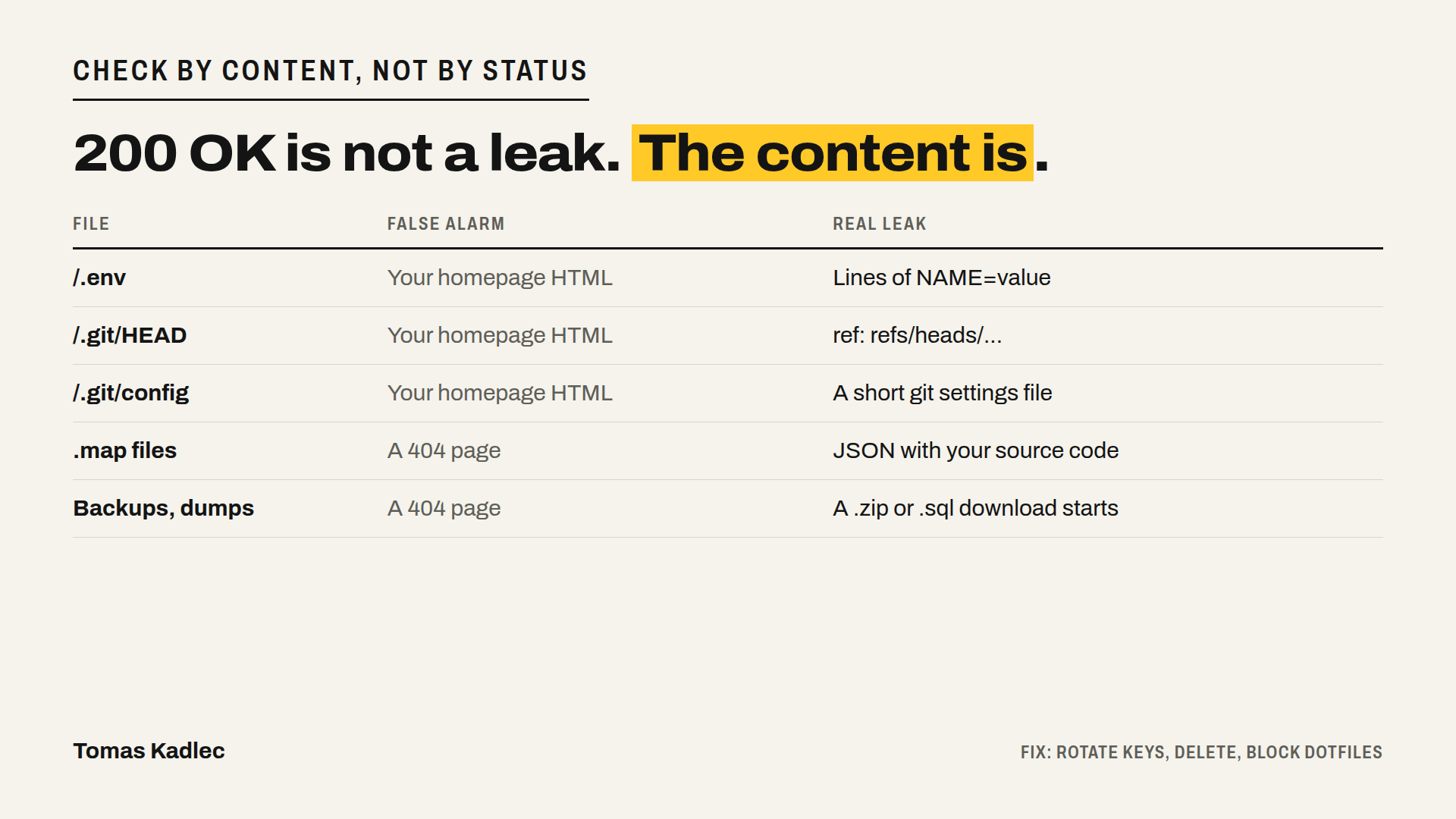
Many projects from AI builders use Vite, and many of them are single-page apps. Their server answers every unknown path with index.html and status 200, so the app can show the right page. Ask for /.env, /.git/HEAD or /banana and you get your homepage with 200. A scanner that only reads the status code reports a "leak" for every one of them. After three false alarms people stop reading warnings. That is worse than having no scanner.
I learned this lesson with my own tool. On launch day my security check told me my site does not redirect HTTP to HTTPS. That was wrong. The server sent a 301, but the tool followed the whole redirect chain and only saw the final 200. I fixed it the same afternoon. A status code is a hint. It is not proof.
Check by content, not by status
What a real leak looks like:
- /.env: plain text, line after line of NAME=value. If you see your homepage, it is the fallback and not a leak.
- /.git/HEAD: one short line that starts with ref: refs/heads/. /.git/config is a short settings file, not a web page.
- A .map file: JSON with a list of sources and often your original code inside.
- A backup: your browser starts downloading a zip or sql file.
The one nginx line
If your site runs behind nginx, this line blocks every path that starts with a dot, except .well-known:
location ~ /\.(?!well-known) { deny all; }
Keep the .well-known exception. It is a registered public path (RFC 8615), and Let's Encrypt needs it for your certificates. If you block it, certificate renewal can fail weeks later, and you will not connect the two.
Even better, do not deploy these files at all. Ship only the build output, not the whole project folder.
If you build with Lovable, Bolt, v0 or Replit
You often cannot edit the server config. Give your builder this prompt:
Check my project and my deploy settings for files that must never be public: .env files, the .git folder, source maps (.map files), backups and database exports.
1. Tell me which of them end up in the published site.
2. Make sure production builds do not publish source maps.
3. Make sure secret keys are only used on the server, never in frontend code.
4. If the host allows it, block all paths that start with a dot, except /.well-known/.
Do not change anything else. Then list what you changed and which keys I should rotate.
Found one? Deleting it is not enough
Assume every secret in the file is already known. First rotate: new API keys, new database password, new payment secrets. Then delete the file and block the path. If .git was public, rotate everything that was ever in the history, not only what is in the current code. After the Unit 42 report, AWS said env files should never be public, and even private ones should not hold AWS credentials.
Run the check
The free Website security check looks at your site from outside without attacking it. It will not see your database rules, who can log in, your payment logic or your private API routes. So a clean result means "no obvious holes from outside", not "secure".
Which of these four files would you bet is not on your server right now?
Sources: own launch of the Website security check and the HTTPS redirect fix, 18 November 2026 · Palo Alto Networks Unit 42, Leaked Environment Variables Allow Large-Scale Extortion Operation in Cloud Environments, August 2024 · SecurityWeek, Cloud Misconfigurations Expose 110,000 Domains to Extortion in Widespread Campaign, August 2024 · CSO Online, AWS environments compromised through exposed .env files, August 2024 · Vite, Build Options: build.sourcemap, accessed 18 November 2026 · DEV Community, Can people see my app's source code? Source maps, explained, October 2026 · Legba, Exposed .git Directory, accessed 18 November 2026 · OpenReplay, How to Fix Cannot GET Errors After Deploying an SPA, accessed 18 November 2026 · Maxim Orlov, Don't Accidentally Serve Dotfiles With Nginx, accessed 18 November 2026 · IETF, RFC 8615 Well-Known Uniform Resource Identifiers, May 2019.