Consent Mode v2: check it works in 2 minutes
What Consent Mode v2 is, who needs it, basic vs advanced, and how to check it works with the Network tab, gcs values and Tag Assistant.
Consent Mode v2 is how your website tells Google tags what the visitor chose in the cookie banner. If you have visitors from the EEA, the UK or Switzerland and you use Google Ads or GA4, Google expects these signals. You can check that it really works in about 2 minutes, in your own browser, without admin access. Open the Network tab, read the gcs parameter before and after the banner click, then confirm in the Tag Assistant consent tab.
What is Consent Mode v2?
Consent mode lets website and app developers control how Google tags and SDKs behave based on users' consent choices for data storage and use. It is not the banner itself. The banner collects the choice. Consent Mode passes it to Google.
Version 2 has four signals:
- ad_storage: may ad cookies be stored.
- analytics_storage: may analytics cookies be stored.
- ad_user_data: sets consent for sending user data to Google for advertising purposes.
- ad_personalization: sets consent for personalized advertising.
The first two control storage. Simo Ahava puts it well: they are upstream, while ad_user_data and ad_personalization are downstream instructions for Google services on how to process the data.
Do I need Consent Mode v2?
Google's own rule: if a user from the EEA is using your website or app and you measure user behavior with Google tags, you need to pass through end-user consent choices to Google. Google Ads Help also says if you don't send consent signals, you will lose ads personalization capabilities. The ad_user_data parameter is required for regions that require end-user consent: the European Economic Area (EEA), the United Kingdom, and Switzerland.
For GA4 linked to Google Ads, if you take no action, only end users outside the EEA will be included in audiences used by your linked advertising products starting early March, 2024.
This is what Google requires for its products. What the law requires from your banner is a separate question. I am not a lawyer, so ask yours.
Consent mode advanced vs basic
Google offers two implementations: basic, which blocks tags until consent; and advanced, which loads tags with default settings and adjusts behavior based on consent, allowing for more detailed conversion modeling. With basic, conversion modeling in Ads is then based on a general model. Advanced provides an advertiser-specific model as opposed to a general model.
Basic still counts as implemented. Simo Ahava wrote that the requirement is to implement Consent Mode, and Basic Consent Mode will do just fine. In my opinion, e-shops with real Google Ads spend should at least look at advanced, because modeling matters for bidding. But make that decision together with the person who owns your privacy policy.
How to check Consent Mode v2 is working (2 minutes)
Four steps, about 30 seconds each, 2 minutes total. You need Chrome and the page URL. No logins.
- Load the page clean (30 s). Open an incognito window, press F12, open Network. Load the page and do not touch the banner. You can filter the network list by collect or by google and open any hit to read its query string.
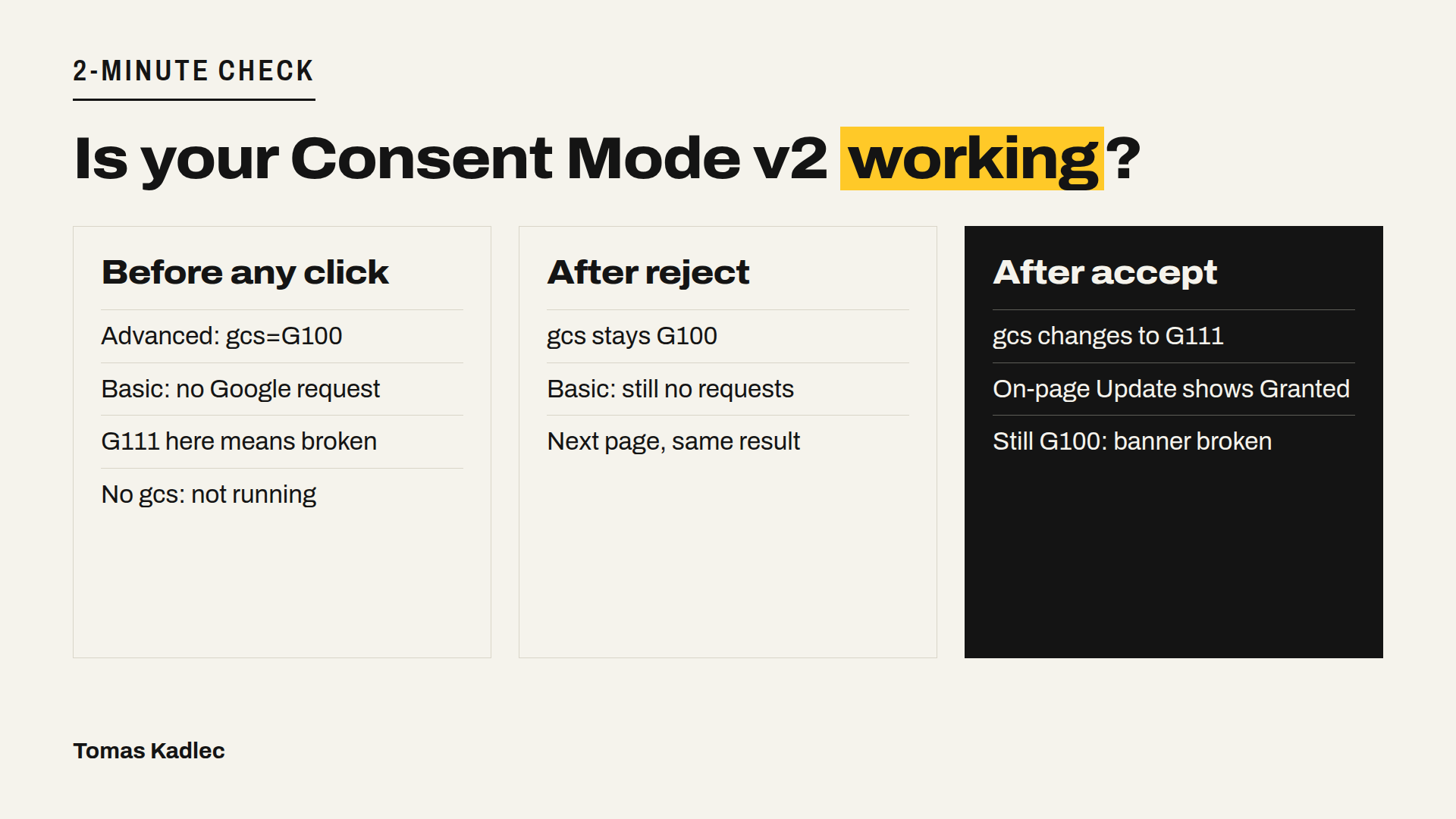
- Read gcs before any click (30 s). In advanced mode you should see gcs=G100. In basic mode you should see no Google request at all. If you already see G111 before the visitor clicked anything, your default is wrong, or the tag fired before the default was set.
- Reject and click to another page (30 s). gcs should stay G100 (advanced), or Google requests should stay absent (basic).
- New incognito window, accept (30 s). gcs should change to G111. If it stays G100, the banner is not sending the update.
What do G100, G101, G110 and G111 mean?
Google says the gcs parameter is used to transmit the ad_storage and analytics_storage parameters. The format is G1 plus two digits. The first digit is the advertising storage state and the second is the analytics storage state, where 1 means granted and 0 means denied.
- G100: both denied.
- G110: ads granted, analytics denied.
- G101: analytics granted, ads denied.
- G111: both granted.
Be careful here. Google's overview says consent mode parameters are translated into HTTP request parameters such as dma, gcd, and gcs, but I could not find a Google page that publishes the value table. The table above comes from practitioners. Simo Ahava warns that these are internal parameters used by Google. Their values can change without warning. Sources also disagree. One guide claims the digits cover ad_storage, analytics_storage, and ad_user_data respectively. That does not fit Google's own description of gcs, so I go with Google.
Two more useful facts. G100 is only possible in "Advanced Consent Mode". And no gcs parameter means consent mode is not running on that tag at all.
What about the gcd parameter?
gcd carries all four signals. Google says it is always sent to Google services, regardless of whether consent mode is activated or not. The gcd parameter encodes detailed information about the user's consent choice through the consent types. Google does not publish how to decode it. From community testing, a page without consent mode still sent gcd=13l3l3l3l1l1, so many "l" letters mean "not set". Treat any gcd decoding as a hint, not a fact.
How to use the Tag Assistant consent tab
If you go to https://tagassistant.google.com/, you can debug the consent states for any sites running Google Tags. So this also works without access to the account.
- Select the first event, open Consent, and check the On-page Default column.
- Accept the banner, then check the "On-page Update" column. Ensure it's set to "Granted".
- The Tag Assistant Consent tab is empty when consent mode is not implemented on the page.
If you have Google Ads access, there is a third check. But the active consent mode status can take 48 hours to appear in Google Ads, but it may take up to 2 weeks in certain instances.
Common Consent Mode v2 failures
- Tags fire before the consent default. The Consent tab will show "A tag read consent state before a default was set" error if this is the case. In GTM, it is recommended that the Consent Initialization trigger is used for consent-writing tags.
- The banner never updates consent. gcs stays G100 after accept, On-page Update stays empty. Check your CMP settings to activate Google consent mode.
- Hardcoded tags outside GTM. An old gtag.js snippet in the theme or a plugin can load before GTM sets the default. One fix guide says to hard-code the gtag('consent', 'default', ...) command physically above your Google Tag Manager script. Even better, remove the duplicate tag.
- Banner and default cover different regions. Google advises: align the consent banner and consent default command to target the same regions.
Also remember: non-Google tags need their own blocking rules; they do not automatically obey Google's signals.
A prompt to decode your requests
Copy the full request URLs from steps 2 and 4 and paste them into an AI assistant with this:
Below are Google request URLs copied from my browser Network tab. Request A was sent before I clicked the cookie banner. Request B was sent after I clicked "Accept all".
For each request, list the gcs, gcd, tid and en parameters.
Tell me if gcs is missing, if it is G111 before the click, or if it is still G100 after accept.
Say clearly that gcs and gcd value meanings are not officially documented by Google, and do not guess beyond that.
FAQ
Is Consent Mode v2 required outside Europe?
Google's requirement covers the EEA, the UK and Switzerland. For other countries, check your local law separately.
Is there a free consent mode checker?
Yes. Google Tag Assistant is free and official, and the browser Network tab costs nothing. Use both: Tag Assistant shows the consent state, the Network tab shows the request that actually left the browser.
Why do I still see G100 after I click accept?
The banner does not send the consent update to Google tags. Check the CMP's Consent Mode setting and the On-page Update column in Tag Assistant.
Next step
If you want a quick look at your own page, my free Google Ads tracking check shows which Google tags fire on the page and whether the Google Ads tag and conversion events fire. It reports what it sees, and it does not replace the consent test above.
What did your gcs show before you clicked the banner?
Sources: Google for Developers, Consent mode overview, checked 22 November 2026 · Google for Developers, Troubleshoot consent mode with Tag Assistant, checked 22 November 2026 · Google Ads Help, Updates to consent mode for traffic in European Economic Area (EEA), checked 22 November 2026 · Google Ads Help, Obtain user consent, checked 22 November 2026 · Google Ads Help, Verify your consent signals, checked 22 November 2026 · Analytics Help, Verify and update consent settings in Google Analytics, checked 22 November 2026 · Tag Manager Help, Verify consent mode implementation, checked 22 November 2026 · Tag Assistant Help, Consent Mode troubleshooting for Google Ads, checked 22 November 2026 · Simo Ahava, Consent Mode V2 For Google Tags, checked 22 November 2026 · FlexyConsent, Debugging Google Consent Mode with Browser DevTools, checked 22 November 2026 · Consent Mode HQ, Your CMP Says Denied. What Did Google's Tag Actually Send?, checked 22 November 2026 · Seresa, How do you check Consent Mode v2 using the gcs parameter?, checked 22 November 2026 · Conzent, How to Fix Google Consent Mode v2 Errors, checked 22 November 2026 · Multiminds, How-to: Configure Consent Mode in Google Tag Manager, checked 22 November 2026 · DEV Community, Debugging Google Consent Mode v2 in Tag Assistant, checked 22 November 2026